Thinking about how we think is difficult, because thoughts of thoughts are limited by thoughts itself. But learning of how we think is essential in computing as well as AI powered robots. The basic reason of our thinking ability is a special type of cells in brain - neurons. A neuron is not perfectly known to human yet, but many similar models are proposed. The power of neurons is in its networking ability. Neurons are connected to each other and these complex networks may called as neural networks. I am not describing much about neurons because it is beyond our task. It's well enough if you just get an overview from Wikipedia. As I said, many convenient models are there to explain the behaviour of a neuron (Of course, a networked neuron is complex than a single one), but I am just touching simplest one named Perceptron. I will also mention back propagation during the example. I have pasted one figure from Wikipedia because you need it.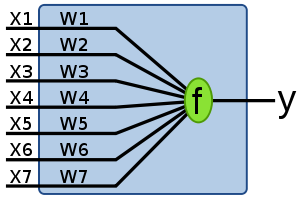 The area in the shaded square can be considered as a neuron. x1,x2,......x7 are the inputs and w1,w2.......w7 are the corresponding weights (I will tell you what it is). and f is simply a function and outputs y. If the weighted sum of the inputs exceeds a particular threshold (which is previously be set), output y fires out. In actual neurons, y depends on other parameters such as input frequency. Since whole process in actual neurons are chemical, the explanation become rather complicated. But in all models we consider input as well as output signals are electrical in nature.I am explaining once again: first find
I hope you understand something. But I know most of you are not satisfied because, you don't know what is really going on! Right?
Let me tell an example. This is a story. Here is you, Heroin is you.
Consider you have three friends and you(your brain) thinks that they are:
The problem starts here. You are getting ready to go to your office/college. There are two ways to go. One is short path (easy way). Other is long. But short way has a problem is that sometimes it will be blocked. If you take the long path, you may reach the destination late. But if you choose the short path and in any case if blocked, you can't reach the destination on that day.
Then you come to know that today short way will be blocked. Then you consult your friends. Check their opinion:
Let's look how your brain solve the problem. Albert surely says that road is not blocked. Put a value of +0.95 for his opinion. The positive sign indicates that he is opposing. If Albert says sure that road blocked, the value may be -0.95. You don't know much about Deepika. But she may be right. Put a value of +0.1. Tom says it is blocked. So put -0.8.
Here threshold value is 0. If weighted sum is greater than 0. road is blocked. It is good to choose the long way. I not, road is not blocked, choose the short path.
Weighted sum is:
signal strength of Albert * confidence level+ signal strength of Deepika * confidence level+ signal strength of Tom * confidence level
=0.95*0.7 + 0.1*o.3 + (-0.8)*(-0.55)
=0.66+0.03+0.44
=1.13 which is greater than 0.
The brain successfully derived a decision for you. It is almost sure that road blocked with a confidence level of 1.13. Did you notice the analysis of Mr.Tom's opinion. You think tom is cheat. So the opposite of what he tells will be right. If you didn't understand the meaning of previous sentence just read one more time because some interesting things hidden in that sentence.
Ok, let's continue our story. Then you started going straight away through short path . You started journey in your own car but Alas! road is blocked. You couldn't just believe your eyes. but suddenly you realize the fact that you can't reach your destination today - you trapped in a huge road block.
Here, your brain attempts to rewire the entire circuitry inside it. Your thoughts were entirely wrong. Both Albert and Deepika was wrong, but Tom was right. You change the congedence level as,
 The area in the shaded square can be considered as a neuron. x1,x2,......x7 are the inputs and w1,w2.......w7 are the corresponding weights (I will tell you what it is). and f is simply a function and outputs y. If the weighted sum of the inputs exceeds a particular threshold (which is previously be set), output y fires out. In actual neurons, y depends on other parameters such as input frequency. Since whole process in actual neurons are chemical, the explanation become rather complicated. But in all models we consider input as well as output signals are electrical in nature.I am explaining once again: first find
 x1*w1+x2*w2+.........+x7*w7If the resultant value is greater than a threshold (Typically 0), y=1; otherwise y=0.
I hope you understand something. But I know most of you are not satisfied because, you don't know what is really going on! Right?
Let me tell an example. This is a story. Here is you, Heroin is you.
Consider you have three friends and you(your brain) thinks that they are:
- Albert - Your best friend. You have a confidence level of 0.7 on him. You trust him and ask his opinion before every important attempt
- Deepika - Your classmate. Confidence level 0.3. Good personality.
- Tom(me) - Confidence level of -0.55. Always say lie. Cheating personality.
The problem starts here. You are getting ready to go to your office/college. There are two ways to go. One is short path (easy way). Other is long. But short way has a problem is that sometimes it will be blocked. If you take the long path, you may reach the destination late. But if you choose the short path and in any case if blocked, you can't reach the destination on that day.
Then you come to know that today short way will be blocked. Then you consult your friends. Check their opinion:
- Albert - Short road is not blocked. Damn sure.
- Deepika - Someone told me about it. Short way may not be blocked. But I am not sure.
- Tom - Hey man, road is blocked.
Let's look how your brain solve the problem. Albert surely says that road is not blocked. Put a value of +0.95 for his opinion. The positive sign indicates that he is opposing. If Albert says sure that road blocked, the value may be -0.95. You don't know much about Deepika. But she may be right. Put a value of +0.1. Tom says it is blocked. So put -0.8.
Here threshold value is 0. If weighted sum is greater than 0. road is blocked. It is good to choose the long way. I not, road is not blocked, choose the short path.
Weighted sum is:
signal strength of Albert * confidence level+ signal strength of Deepika * confidence level+ signal strength of Tom * confidence level
=0.95*0.7 + 0.1*o.3 + (-0.8)*(-0.55)
=0.66+0.03+0.44
=1.13 which is greater than 0.
The brain successfully derived a decision for you. It is almost sure that road blocked with a confidence level of 1.13. Did you notice the analysis of Mr.Tom's opinion. You think tom is cheat. So the opposite of what he tells will be right. If you didn't understand the meaning of previous sentence just read one more time because some interesting things hidden in that sentence.
Ok, let's continue our story. Then you started going straight away through short path
 . You started journey in your own car but Alas! road is blocked. You couldn't just believe your eyes. but suddenly you realize the fact that you can't reach your destination today - you trapped in a huge road block.
Here, your brain attempts to rewire the entire circuitry inside it. Your thoughts were entirely wrong. Both Albert and Deepika was wrong, but Tom was right. You change the congedence level as,
- Albert - 0.4 - I can't blive he cheated me.
- Deepika - 0.1 - no coments.
- Tom - 0.2 - oh, sorry Tom.


