Before reading this tutorial, read my previous post "Qt programming in Malayalam" if you have not read it yet.
Have you ever wonder about easy switching from English to other languages such as French, Spanish etc. in software applications? Even though Malayalam switching is rare, translation is possible in Malayalam as well like any other language. Qt provides an easy way of language switching by means of Qt linguist. This tutorial describe how to build a Malayalam switchable application in Qt. An easy to start tutorial is packaged with Qt Help itself. Here is a quick tutorial of how to build a Malayalam application if you have the source code of the English version. Before we start, I assume:
1) You have Qt installed in your PC.
2) You have a very basic knowledge of Qt programming. How to compile, build and all.
If the above is not qualified, sorry, it is better to pause here and read this and resume. Suppose you have a Qt application in English (If you have not your own, a lot of examples are there in qtdir/qt/examples. (qtdir is the directory where you installed Qt). For better understanding, I prefer an application named 'QMusicPlayer' from examples(qtdir/qt/examples/phonon/qmusicplayer). You can take other examples as well. Open qmusicplayer.pro using Qt, then build and run it. You will get a minimal musicplayer in English. Now our aim is to make the malayalam version of the same application.

Now we need to edit two files 'main.cpp' and 'qmusicplayer.pro' as follows:
main.cpp
qmusicplayer.pro
Changes made in the code are highlighted. The changes in code simply add a Translator feature to your application. While running, your application will seek a file named 'malayalam.qm' which contains one to one translation of all English words used in program to Malayalam. 'malayalam.qm' is a binary file and is to be generated from a file named 'malayalam.ts'. This file is automatically generated using the command in terminal:
lupdate -verbose qmusicplayer.pro
Then the newly generated file - 'malayalam.ts' can be seen in the project directory. But it is an empty file and we need to update that file with all one to one translations. To do so, open the file with Qt linguist:
linguist malayalam.ts
If you couldn't find any command like 'lupdate' or 'linguist', most probably, you have not added the qt directory to the PATH. To do this use the following command Linux,
PATH=$PATH:qtdir/qt/bin/
directory may be different and must change it as your needs. Then use 'lupdate' and 'linguist'. If you are still stucked, check whether you completely installed Qt SDK. In Windows, if you are using Qt enabled prompt, I hope there will be no any problem.

Now I assume you opened 'malayalam.ts' successfully in Qt Linguist. It shows all english words which translation is enabled. (Refer fig). Click on each english word in 'Source Text' list and add curresponding Malayalam translation in the 'English Translation' edit box at the bottom (highlighted on figure). Repeat the process for all words and save. Then File->Release. It will generate the binary file 'malayalam.qm' in the same directory.
Now run the qmusicplayer application with file 'malayalam.qm' is placed in the same directory of the executable. Now you can see the malayalam version of 'qmusicplayer'.

In the absense of the file 'malayalam.qm', there will be no run time error in the program, it simply shows the english version. Similarly you can build a multi-lingual swithable version.
Have you ever wonder about easy switching from English to other languages such as French, Spanish etc. in software applications? Even though Malayalam switching is rare, translation is possible in Malayalam as well like any other language. Qt provides an easy way of language switching by means of Qt linguist. This tutorial describe how to build a Malayalam switchable application in Qt. An easy to start tutorial is packaged with Qt Help itself. Here is a quick tutorial of how to build a Malayalam application if you have the source code of the English version. Before we start, I assume:
1) You have Qt installed in your PC.
2) You have a very basic knowledge of Qt programming. How to compile, build and all.
If the above is not qualified, sorry, it is better to pause here and read this and resume. Suppose you have a Qt application in English (If you have not your own, a lot of examples are there in qtdir/qt/examples. (qtdir is the directory where you installed Qt). For better understanding, I prefer an application named 'QMusicPlayer' from examples(qtdir/qt/examples/phonon/qmusicplayer). You can take other examples as well. Open qmusicplayer.pro using Qt, then build and run it. You will get a minimal musicplayer in English. Now our aim is to make the malayalam version of the same application.

Now we need to edit two files 'main.cpp' and 'qmusicplayer.pro' as follows:
main.cpp
#include
#include "mainwindow.h"
#include
//![1]
int main(int argv, char **args)
{
QApplication app(argv, args);
QTranslator translator;
translator.load("malayalam");
app.installTranslator(&translator);
app.setApplicationName("Music Player");
app.setQuitOnLastWindowClosed(true);
MainWindow window;
window.show();
return app.exec();
}
qmusicplayer.pro
QT += phonon
HEADERS += mainwindow.h
SOURCES += main.cpp \
mainwindow.cpp
TRANSLATIONS = malayalam.ts
# install
target.path = $$[QT_INSTALL_EXAMPLES]/phonon/qmusicplayer
sources.files = $$SOURCES $$HEADERS $$FORMS $$RESOURCES *.pro *.png images
sources.path = $$[QT_INSTALL_EXAMPLES]/phonon/qmusicplayer
INSTALLS += target sources
wince*{
DEPLOYMENT_PLUGIN += phonon_ds9 phonon_waveout
}
symbian:TARGET.UID3 = 0xA000CF6A
Changes made in the code are highlighted. The changes in code simply add a Translator feature to your application. While running, your application will seek a file named 'malayalam.qm' which contains one to one translation of all English words used in program to Malayalam. 'malayalam.qm' is a binary file and is to be generated from a file named 'malayalam.ts'. This file is automatically generated using the command in terminal:
lupdate -verbose qmusicplayer.pro
Then the newly generated file - 'malayalam.ts' can be seen in the project directory. But it is an empty file and we need to update that file with all one to one translations. To do so, open the file with Qt linguist:
linguist malayalam.ts
If you couldn't find any command like 'lupdate' or 'linguist', most probably, you have not added the qt directory to the PATH. To do this use the following command Linux,
PATH=$PATH:qtdir/qt/bin/
directory may be different and must change it as your needs. Then use 'lupdate' and 'linguist'. If you are still stucked, check whether you completely installed Qt SDK. In Windows, if you are using Qt enabled prompt, I hope there will be no any problem.
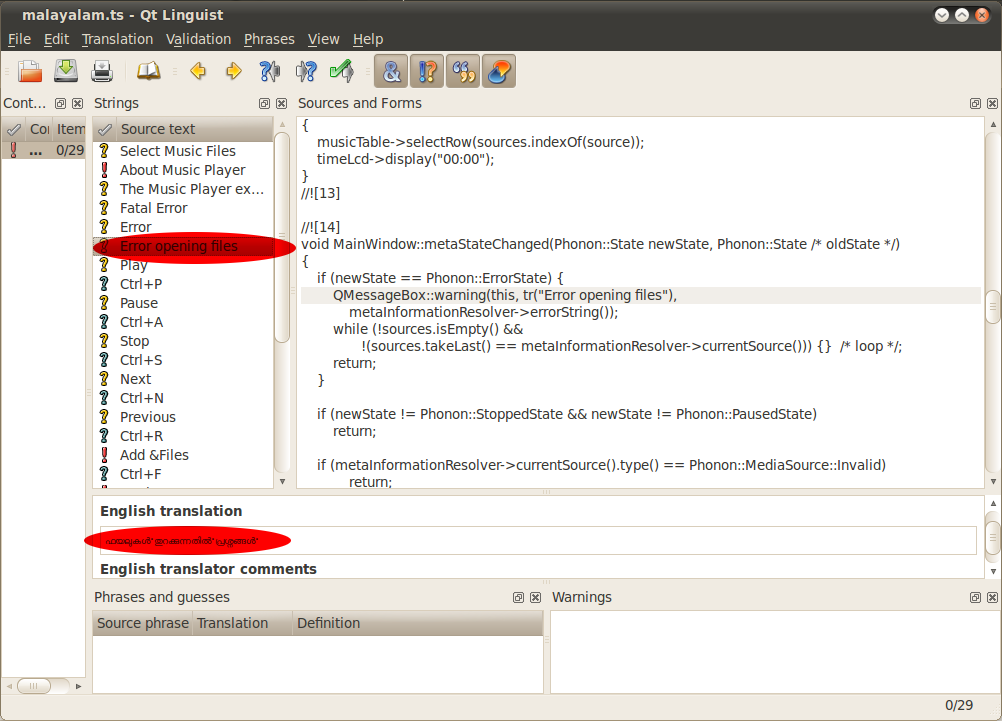
Now I assume you opened 'malayalam.ts' successfully in Qt Linguist. It shows all english words which translation is enabled. (Refer fig). Click on each english word in 'Source Text' list and add curresponding Malayalam translation in the 'English Translation' edit box at the bottom (highlighted on figure). Repeat the process for all words and save. Then File->Release. It will generate the binary file 'malayalam.qm' in the same directory.
Now run the qmusicplayer application with file 'malayalam.qm' is placed in the same directory of the executable. Now you can see the malayalam version of 'qmusicplayer'.

In the absense of the file 'malayalam.qm', there will be no run time error in the program, it simply shows the english version. Similarly you can build a multi-lingual swithable version.


